1、创建.net6 web api 项目
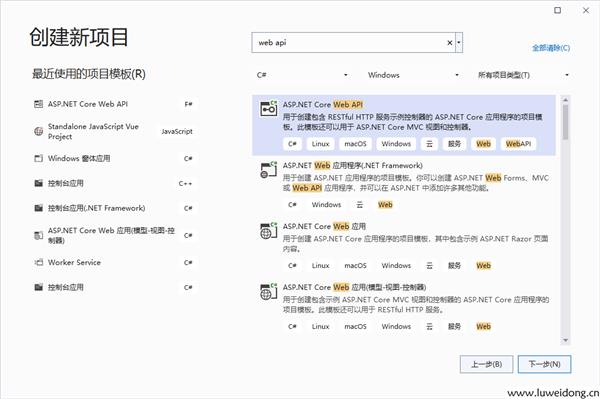
IFileService.cs
namespace WebApplication1.service
{
    public interface IFileService
    {
        void UploadFile(List<IFormFile> files, string subDirectory);
        (string fileType, byte[] archiveData, string archiveName) DownloadFiles(string subDirectory);
        string SizeConverter(long bytes);
    }
}
FileService.cs
using System.IO.Compression;

namespace WebApplication1.service;

public class FileService : IFileService
{
    #region Property

    private readonly IWebHostEnvironment _webHostEnvironment;

    #endregion

    #region Constructor

    public FileService(IWebHostEnvironment webHostEnvironment)
    {
        _webHostEnvironment = webHostEnvironment;
    }

    #endregion

    #region Upload File

    public void UploadFile(List<IFormFile> files, string subDirectory)
    {
        subDirectory = subDirectory ?? string.Empty;
        var target = Path.Combine(_webHostEnvironment.ContentRootPath, subDirectory);

        Directory.CreateDirectory(target);

        files.ForEach(async file =>
        {
            if (file.Length <= 0) return;
            var filePath = Path.Combine(target, file.FileName);
            await using var stream = new FileStream(filePath, FileMode.Create);
            await file.CopyToAsync(stream);
        });
    }

    #endregion

    #region Download File

    public (string fileType, byte[] archiveData, string archiveName) DownloadFiles(string subDirectory)
    {
        var zipName = $"archive-{DateTime.Now:yyyy_MM_dd-HH_mm_ss}.zip";

        var files = Directory.GetFiles(Path.Combine(_webHostEnvironment.ContentRootPath, subDirectory)).ToList();

        using var memoryStream = new MemoryStream();
        using (var archive = new ZipArchive(memoryStream, ZipArchiveMode.Create, true))
        {
            files.ForEach(file =>
            {
                var theFile = archive.CreateEntry(Path.GetFileName(file));
                using var binaryWriter = new BinaryWriter(theFile.Open());
                binaryWriter.Write(File.ReadAllBytes(file));
            });
        }

        return ("application/zip", memoryStream.ToArray(), zipName);
    }

    #endregion

    #region Size Converter

    public string SizeConverter(long bytes)
    {
        var fileSize = new decimal(bytes);
        var kilobyte = new decimal(1024);
        var megabyte = new decimal(1024 * 1024);
        var gigabyte = new decimal(1024 * 1024 * 1024);

        return fileSize switch
        {
            _ when fileSize < kilobyte => "Less then 1KB",
            _ when fileSize < megabyte =>
                $"{Math.Round(fileSize / kilobyte, 0, MidpointRounding.AwayFromZero):##,###.##}KB",
            _ when fileSize < gigabyte =>
                $"{Math.Round(fileSize / megabyte, 2, MidpointRounding.AwayFromZero):##,###.##}MB",
            _ when fileSize >= gigabyte =>
                $"{Math.Round(fileSize / gigabyte, 2, MidpointRounding.AwayFromZero):##,###.##}GB",
            _ => "n/a"
        };
    }

    #endregion
}
创建API控制器:FileController
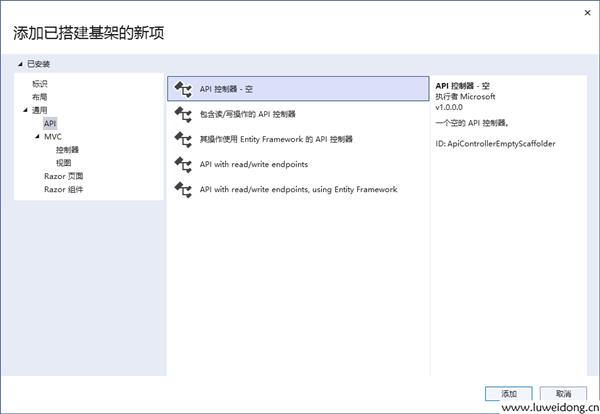
using Microsoft.AspNetCore.Http;
using Microsoft.AspNetCore.Mvc;
using System.ComponentModel.DataAnnotations;

namespace WebApplication1.service
{
    [Route("api/[controller]")]
    [ApiController]
    public class FileController : ControllerBase
    {
        private readonly IFileService _fileService;

        public FileController(IFileService fileService)
        {
            _fileService = fileService;
        }

        [HttpPost(nameof(Upload))]
        public IActionResult Upload([Required] List<IFormFile> formFiles, [Required] string subDirectory)
        {
            try
            {
                _fileService.UploadFile(formFiles, subDirectory);

                return Ok(new { formFiles.Count, Size = _fileService.SizeConverter(formFiles.Sum(f => f.Length)) });
            }
            catch (Exception ex)
            {
                return BadRequest(ex.Message);
            }
        }

        [HttpGet(nameof(Download))]
        public IActionResult Download([Required] string subDirectory)
        {
            try
            {
                var (fileType, archiveData, archiveName) = _fileService.DownloadFiles(subDirectory);

                return File(archiveData, fileType, archiveName);
            }
            catch (Exception ex)
            {
                return BadRequest(ex.Message);
            }
        }
    }
}
在Program.cs中注入服务:
using WebApplication1.service;

var builder = WebApplication.CreateBuilder(args);

// Add services to the container.
// Learn more about configuring Swagger/OpenAPI at https://aka.ms/aspnetcore/swashbuckle
builder.Services.AddControllers();
builder.Services.AddSwaggerGen();

// 主要是添加下面这句代码,注入文件服务
builder.Services.AddTransient<IFileService, FileService>();

var app = builder.Build();

// Configure the HTTP request pipeline.
if (app.Environment.IsDevelopment())
{
    app.UseSwagger();
    app.UseSwaggerUI();
}


app.MapControllers();

app.Run();
下载码:CF2AF7C49B
下载码是啥?如何下载=》点击查看